Welcome
Happy New Year! Welcome to the monthly digest from us here at Analytics for Schools. Each month we’ll showcase practical and upcoming features of the platform, provide useful ways to use evidence from students to support teaching, and share explainer videos and readings to deepen understanding of assessment.
A short word about Ben Lawless, the newest member of the Analytics for Schools team. He has over two decades of teaching and providing assessment advice to both K-12 schools and The University of Melbourne, where he teaches assessment and evaluation. A valuable addition that strengthens our assessment expertise and school support.

We’re excited to welcome Cranbourne Secondary College, Beaumaris Secondary College, Penrhos College, and Ashwood High School to the MAESTRO network, and we look forward to supporting them this year.
What’s New in MAESTRO
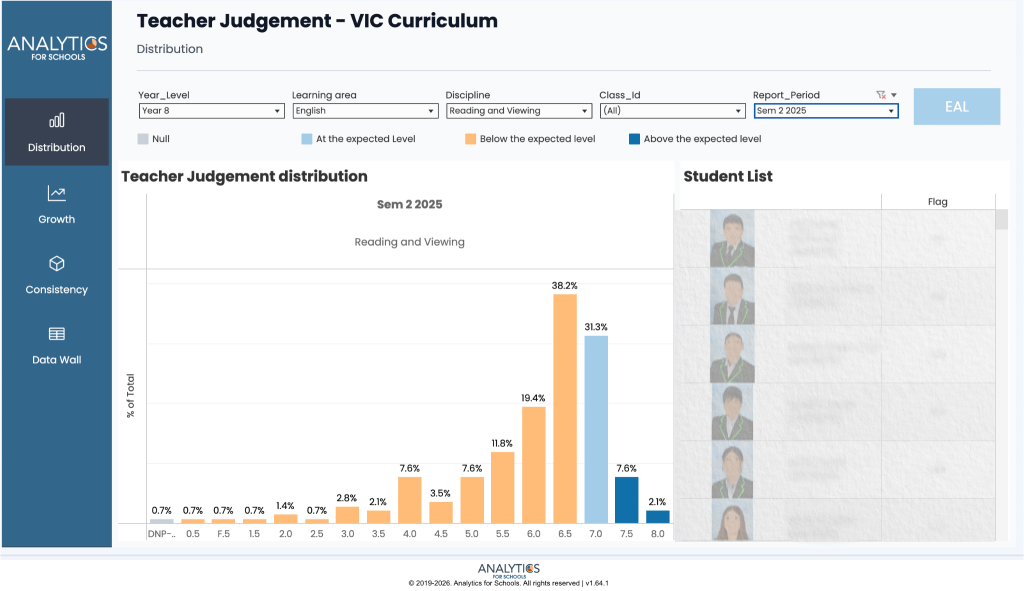
Teacher Judgement Dashboard
A new dashboard in the Analytics module helps teachers review Semester Report outcomes. It shows how students are distributed across result levels, with filters for year level, learning area, discipline, class, and reporting period. It also includes growth views over the past 6 and 12 months, plus a consistency view to support reflection on teacher judgement alongside NAPLAN results.
Data Entry Module
This module lets schools enter their own assessment and survey data directly into MAESTRO, rather than managing it in spreadsheets or separate tools. Teachers and leaders can then view it in custom dashboards and alongside MAESTRO’s existing analytics, making it easier to use evidence when planning next steps. We’ll be sharing more detail in future editions.
MAESTRO Feed
Schools can now share key updates directly in MAESTRO, like reminders, achievements, and deadlines. Posts can be targeted to specific roles or year levels, and documents can be attached when needed.
Actionable Insight
A lot of the assessment we conduct is treated as summative only. However, even when assessment is used for summative purposes (e.g. reports), there’s often an opportunity to get formative uses from it. After an assessment is done, it can be worth running the next session as a feedback lesson. You might have students assess their own work and that of a peer. You could ask them to compare their evaluation with your own. Any differences can be the start of an interesting learning conversation. It may also be useful to have students respond to the feedback you provide. For example, you might ask them to verbally or in writing explain what they have taken away from it. They could use this as the basis for a future learning goal. Even better, they might have an opportunity to use the feedback to complete a similar task. When we give students feedback, it helps to know they’ve understood it and that they’ve had a chance to use it soon after.
If You’ve Got Time
ACER, the Australian Council for Educational Research, is the biggest education research organisation in the southern hemisphere. It regularly releases teacher-friendly translations of research. This article delves into using assessments to improve teaching, not only to report progress to external stakeholders:
ACER explainer: Using student assessment to improve teaching
We hope you have a calm start to the 2026 teaching year and look forward to supporting your teaching.
Have a great month!
From the team at Analytics for Schools 📈