
March 2026
Hello March! The start of the year always feels like a rush, but we hope you are settling into a rhythm for the teaching and learning year ahead. We are officially in Autumn now, a season that hopefully brings a bit of steadiness. This is a great month to recalibrate, revisit expectations with students, and leverage early evidence of learning to guide the next steps in teaching.
What’s New in MAESTRO
Data Entry Module – Surveys
Are you measuring student voice, engagement, wellbeing, feedback on teaching, staff perspectives on assessment practices? If so, how quickly can you see patterns and act on them?
Schools can design multiple survey types for students, teachers, or other groups; all within MAESTRO. Each survey includes its own built-in statistics view, allowing immediate exploration of results without waiting for reports to be built.
With MAESTRO, survey data sits alongside academic and growth data in one connected system. Less time managing data. More time using it.
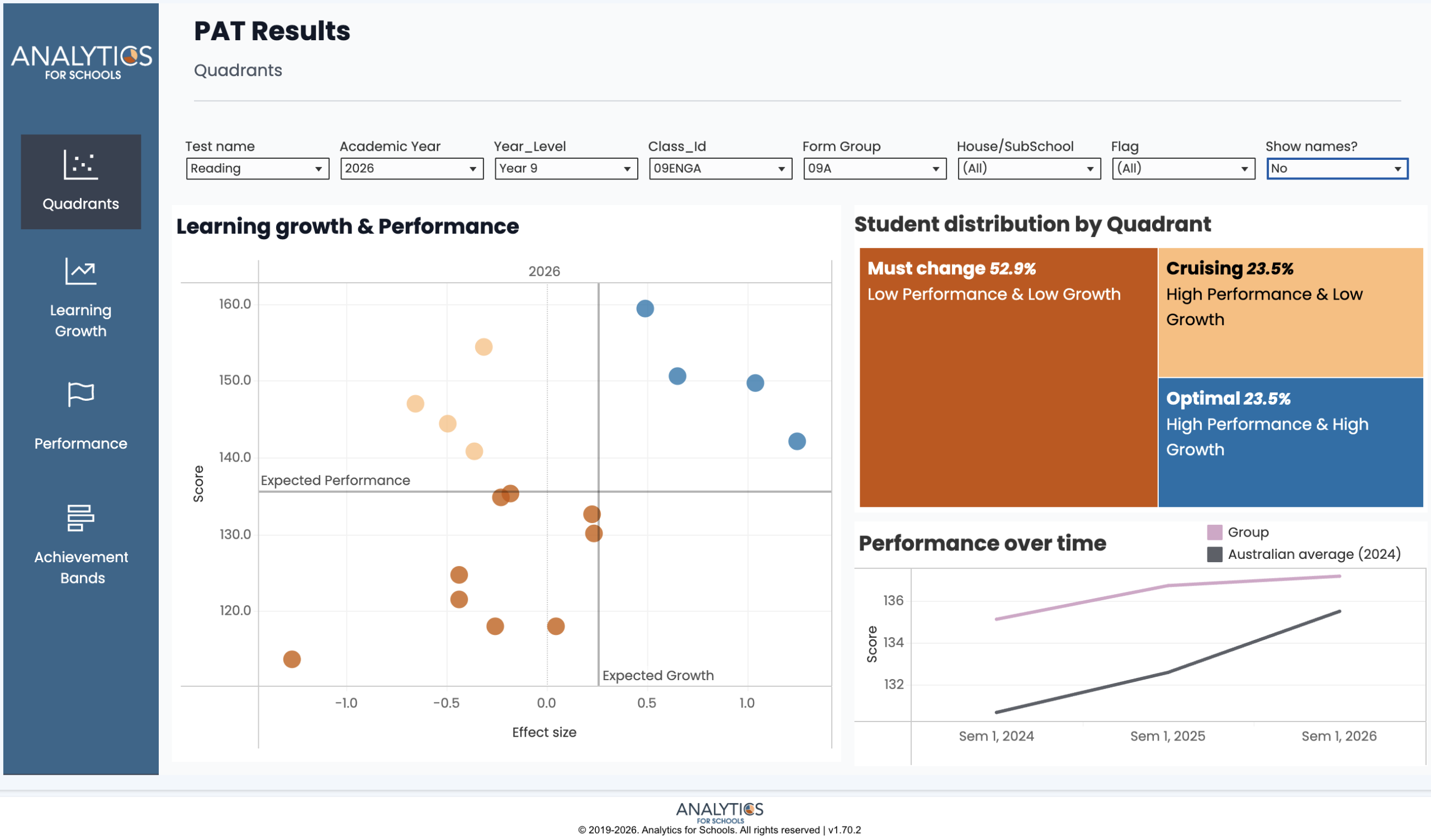
Analytics Module – PAT Dashboard
If students are completing PAT assessments, the key question is: what are we doing with the results?
The PAT Dashboard brings performance and growth together in one clear view. Schools can:
- Visualise learning growth and performance simultaneously
- Identify students in key quadrants (e.g. high growth, low growth)
- Track trends over time
- Support reflection on teaching impact
Without analysis, assessment becomes compliance. With analysis, it becomes actionable.
Assessment Module – Group Marking
Group Marking allows teachers to assess an entire class across multiple skills on a single screen using a Guttman-style chart view.
Marking becomes faster and more informative, giving teachers a clearer picture of class strengths and next teaching priorities as they assess.
Actionable Insight
Most assessment problems are mismatch problems. The task format does not match the content or capability you are trying to assess, so the results are either misleading or too noisy to use.
A simple starting split is item type:
- Selected response suits content where you want to sample recognition, recall, classification, matching, ordering, or selection (for example multiple choice, matching, ordering, cloze). These work best when the construct is tight and the marking rule is clear.
- Constructed response suits content where students must generate, explain, perform, or produce something (for example short answer, written response, diagrams, essays, performances, products, folios). These are the cases where rubrics are usually the better fit, because quality varies and judgement is unavoidable.
Practical rule: start with the construct, then pick the simplest item type that can actually show it, then pick the simplest marking method that still makes the evidence interpretable. This is when MAESTRO becomes useful: the evidence aligns with the construct, and the patterns can translate into next teaching steps.
If You’ve Got Time
The University of Melbourne’s “Assessment and Evaluation Research Centre” has produced this guide for writing assessment questions of all kinds.
We wish you good fortune for the rest of Term 1. If we can be of any help in your analytics or assessment journeys, please reach out.
From your team at Analytics for Schools 📈