
Autumn has settled in, and with the school holidays just a week away, this point in the term can feel both full and slightly frayed at the edges. As assessments are wrapped up and results are entered, it is also a good moment to pause and think about what those results might help you do next.
What’s new in MAESTRO
Data Entry Module – Assessments
Schools can now create their own assessment templates directly in MAESTRO.
Teachers can set up templates that suit their school or subject and enter results straight into the platform. This means results only need to be entered once, instead of being copied across spreadsheets or other systems. It also makes it easier to keep assessment data together in one place. Built-in statistics and assessment rounds are also on the way.
In practice: Instead of juggling multiple files, teachers can enter results, store them, and start looking at patterns in one place.
Why it matters: It cuts down double handling, reduces spreadsheet mess, and makes it easier to move from marking to next steps.
Assessment Module – Student Distribution
The Student Distribution view gives teachers a quick picture of how a class is performing across each skill and level.
Instead of looking at students one by one, teachers can see where most of the class is sitting, which skills may need more teaching, and where some students may be ready for extra challenge.
In practice: After marking, teachers can quickly spot one or two areas to revisit in the next lesson without having to sort through the results manually.
Why it matters: It helps turn a set of marked assessments into a clearer picture of what the class needs next.
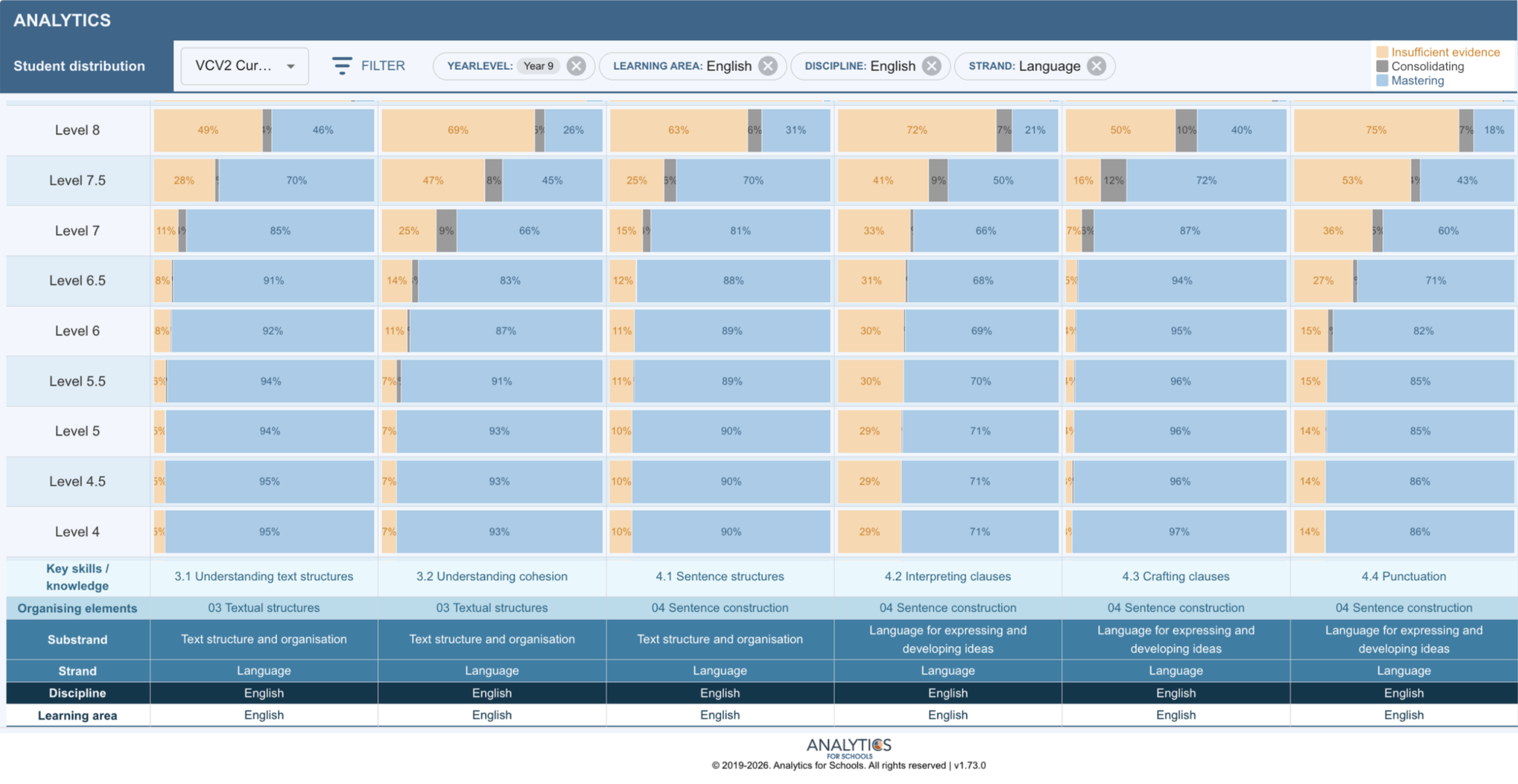
Figure 1: Student distribution of skills in Year 9 English
Actionable Insight
What to Do After You’ve Marked Everything
Marking takes time, so once it is done, it is completely understandable to want to move on. But some of the best value from assessment comes from what happens just after the marking is finished.
Instead of closing the loop, try one of these next week:
- Spend 5 minutes scanning for one pattern across the class. What did a lot of students struggle with?
- Start the next lesson by reteaching just that one idea, not the whole topic.
- Show two anonymous student responses (one strong, one developing) and discuss what makes the difference.
- Group students quickly based on one need and give a short targeted task to each group.
- Ask students to correct one of their own errors and explain what they would do differently next time.
These are small moves, but they shift assessment from something you finish to something you use.
MAESTRO can help make this quicker by showing class-level patterns at a glance, so you can decide what matters most without sorting through everything manually.
If You’ve Got Time
Edutopia is a teacher-focused platform sharing practical, classroom-tested strategies. Here’s a short, practical read on how to turn classroom data into clear next teaching steps:
edutopia.org/blog/new-teachers-how-use-data-inform-instruction-rebecca-alber
We wish you a calm and well-earned break at the end of Term 1. If we can support you in making sense of your data or refining your assessment approaches, please reach out.
From your team at Analytics for Schools 📈